Squares in Squares Digital Paper Collection: Versatile, Crisp, and Creative
Whether you're designing a birthday card for a friend, building a client’s brand mood board, or prepping printable planner pages for your small business—texture, rhythm, and visual cohesion matter. That’s where the Squares in Squares Digital Paper Collection steps in: not as a flashy trend, but as a quietly powerful design tool that delivers consistency, clarity, and creative flexibility—all in 12 high-resolution JPG files.
What Makes This Collection Stand Out?
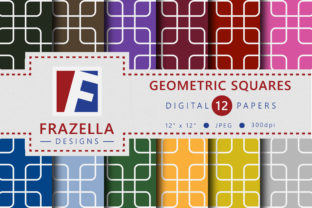
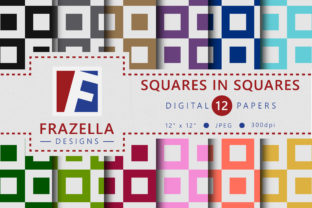
At first glance, “squares within squares” sounds simple—and it is. But simplicity, when executed with precision and intention, becomes a strength. Each paper in the Squares in Squares Digital Paper Collection features clean geometric layering: smaller squares nested neatly inside larger ones, aligned with subtle spacing, balanced contrast, and carefully calibrated scale relationships. No gradients. No noise. No distracting embellishments. Just thoughtful repetition—structured enough to feel grounded, dynamic enough to avoid monotony.
The collection’s strength lies in its restraint. Unlike busy patterns that compete with text or layered elements, these designs recede gracefully into the background—supporting, not overshadowing. That makes them ideal for projects where legibility and hierarchy are non-negotiable: think invitation suites, digital worksheets, product packaging mockups, or even minimalist slide decks.
Resolution That Holds Up—Everywhere You Use It
All 12 papers arrive as high-resolution JPGs—300 DPI, RGB color mode, and sized at 12×12 inches (3600×3600 pixels). Why does that matter? Because resolution isn’t just about printing crispness—it’s about future-proofing your workflow.
- Print-ready out of the box: Whether you’re running a home inkjet or sending files to a professional print shop, these files scale cleanly across greeting cards, scrapbook pages, journal covers, and even fabric transfer sheets.
- Digital versatility: Drag one into Canva, Adobe Express, or Affinity Designer, and it resizes smoothly—even when cropped or tiled. No pixelation, no fuzzy edges.
- Adaptable sizing: Need a seamless tile for a website background? Crop a 6×6 section and repeat it. Want a full-page texture behind a quote graphic? Drop in the full 12×12 file and adjust opacity for subtlety.
That level of fidelity means less time troubleshooting output issues—and more time focusing on what you actually want to say or show.
Where These Papers Shine in Real Projects
You don’t need to be a professional designer to get value from the Squares in Squares Digital Paper Collection. In fact, its greatest utility often appears in everyday creative habits:
Greeting Cards & Invitations
A wedding invitation set built around soft gray squares-in-squares paper feels modern but warm—especially when paired with thin serif typography and muted foil accents. For a child’s birthday card? Swap in a bright coral or cobalt version. The pattern’s neutrality lets color do the emotional heavy lifting—while the geometry adds quiet sophistication.
Digital Scrapbooking & Memory Keeping
Digital scrapbookers love these papers because they layer beautifully. Place a photo over a slightly desaturated square pattern, add a white frame, then overlay handwritten journaling in a clean sans-serif. The repeated shape echoes photo corners, album grids, and layout borders—creating subconscious visual harmony across an entire page.
Planners, Trackers & Printable Kits
Functional printables benefit immensely from subtle texture. A habit tracker printed on a light beige squares-in-squares background feels tactile and intentional—not sterile. It signals care in design without demanding attention. Teachers use these papers for behavior charts; therapists for session worksheets; entrepreneurs for goal-setting dashboards.
Social Media Graphics & Brand Assets
Use a single square pattern as a consistent background element across Instagram story templates or Pinterest pins. When your audience sees that repeated geometry—even unconsciously—they begin associating it with your voice, tone, or aesthetic. Consistency builds recognition. Recognition builds trust.
Why Designers Choose This Over Generic Patterns
There’s no shortage of free or low-cost digital papers online. So why reach for the Squares in Squares Digital Paper Collection specifically?
- Intentional spacing: The gap between inner and outer squares isn’t arbitrary—it’s calibrated for visual breathing room. Too tight feels cramped; too wide reads as disconnected. These strike a rare middle ground.
- Color-aware design: Each paper was developed with real-world pairing in mind. Light grays complement pastels. Deep navy works with gold foil overlays. Warm taupes hold up next to black type. They’re not just pretty—they’re practical.
- No licensing surprises: Included with purchase is full commercial use rights—no attribution required. That means you can sell physical products (like printed journals) or digital goods (like Canva templates) using these papers—without legal second-guessing.
This isn’t just a “pretty background.” It’s a design decision made easier.
Getting Started—No Software Expertise Required
You don’t need Photoshop mastery to use the Squares in Squares Digital Paper Collection. Here’s how beginners and pros alike integrate them seamlessly:
- In Canva: Upload the JPG, insert it as a background, then lock the layer. Add text boxes or shapes on top—adjust transparency if needed for contrast.
- In Procreate: Import as a new layer, then use clipping masks to confine the pattern to specific shapes (e.g., a circle badge or rounded rectangle).
- In Microsoft Word or Google Docs: Set the paper as a page background (via Page Layout > Page Color > Fill Effect > Picture), then layer semi-transparent text boxes for readability.
- For cutting machines (Cricut, Silhouette): Import into Design Space or Studio, then use the pattern as a fill for SVG cut lines—ideal for custom cardstock backings or layered paper crafts.
The format is universal. The application is personal.
Thinking Beyond the Obvious
Most people reach for digital papers to fill space—but the Squares in Squares Digital Paper Collection invites deeper use. Try these less-common approaches:
- Create custom grid overlays: Open one file in Photoshop, desaturate it, reduce opacity to 15%, and place it over a blank document as a subtle guide for aligning elements.
- Build animated transitions: In After Effects or CapCut, animate the scale of a squares-in-squares layer beneath static text—creating gentle, rhythmic motion that feels intentional, not gimmicky.
- Generate AI-assisted variations: Use one paper as a seed image in tools like Bing Image Creator or Leonardo.Ai—prompt for “same structure, watercolor texture” or “same layout, duotone teal and cream”—to expand your palette while preserving core geometry.
These papers aren’t static assets. They’re springboards.
A Collection Built for Real Workflows
Creative work ebbs and flows. Some days you’re deep in branding strategy. Others, you’re cranking out five thank-you cards before lunch. The Squares in Squares Digital Paper Collection meets you where you are: fast enough for urgency, refined enough for polish, flexible enough for evolution. It doesn’t ask you to change how you work—it simply fits in, quietly elevating the outcome.
And because it’s just 12 files—no bloated bundles, no filler—you spend zero time sifting through irrelevant options. What you download is what you’ll use. Thoughtfully. Repeatedly. Confidently.